
Lexicon on your Stream Deck
Set cues, rate and tag tracks, fix beatgrids and pick your next track with one press. Any Lexicon action that can have a hotkey can go on a key.
Free plugin. Needs Lexicon 1.12 or newer on the Essential or Ultimate plan, and Stream Deck 7.1 or newer on macOS or Windows.Track prep
For listening through new tracks. The cue keys use cue templates 1 to 5, so set those up in Lexicon first with the names and colors you like (here Intro, Build, Drop, Break and Outro). The tag keys use the Custom Tags you numbered 1 and 2.
 PrevPlayNextLoadUndo
 Intro
 Build
 Drop
 Break
 Outro5 starsPeakVocalFavDone
What each key is set to
- PrevPrevious
- PlayPlay/Pause
- NextNext
- LoadLoad selected track
- UndoUndo last action
- IntroAdd cue and apply cue templateNumber 1
- BuildAdd cue and apply cue templateNumber 2
- DropAdd cue and apply cue templateNumber 3
- BreakAdd cue and apply cue templateNumber 4
- OutroAdd cue and apply cue templateNumber 5
- 5 starsSet ratingAmount 5
- PeakToggle Custom Tag(s) assigned to shortcutAmount 1
- VocalToggle Custom Tag(s) assigned to shortcutAmount 2
- FavAdd selected tracks to fav. playlistAmount 1
- DoneIncoming: Mark selected done
What the plugin does
The plugin turns the keys of an Elgato Stream Deck into Lexicon buttons. Each key runs one Lexicon action: anything you can give a hotkey in Lexicon, about 170 actions in total, from Play/Pause to Find mixable tracks.
It is made for prep. Listen through new tracks with one hand on the keys: drop cues with the right name and color, rate and tag tracks, fix a beatgrid and move on to the next track, without reaching for the mouse.
What you can do with it
Cues in one press
Add a cue at the play head with one of your cue templates, so it gets its name and color straight away. The key shows the cue marker in the same color.
Rate and tag
Set a star rating, energy or color, add or toggle Custom Tags, or add the selected tracks to a favorite playlist.
Fix beatgrids
Move, add and delete markers, halve or double the BPM and tap the tempo, with the same icons as the beatgrid controls in Lexicon.
Ghost Curator
Follow your DJ app's decks, show the overlay, roll the dice, or take suggestion 1, 2 or 3 as your next track.
Playlists and pages
Create playlists and smartlists, open a favorite playlist, run Merge, Sort or Cross Reference, or jump to any page in the sidebar.
DeckConnect
Load the selected track onto a deck of your CDJ or XDJ, or the playing track onto an empty deck.
Set it up
Lexicon has to be running. The plugin talks to it through the Local API, on your own computer.
Install the plugin
Download the plugin with the button at the top of this page and double-click the .streamDeckPlugin file. The Stream Deck app installs it. You need Stream Deck 7.1 or newer, on macOS 12 or Windows 10 and newer.
Turn on the Local API
In Lexicon, open Settings, go to Local API and tick Local API Enabled. See Local API in the manual.
Add a key
In the Stream Deck app, drag Send Action from the Lexicon category onto a key. Pick an Action, fill in its setting if it has one, and choose a Key image if you like.
Press it and allow
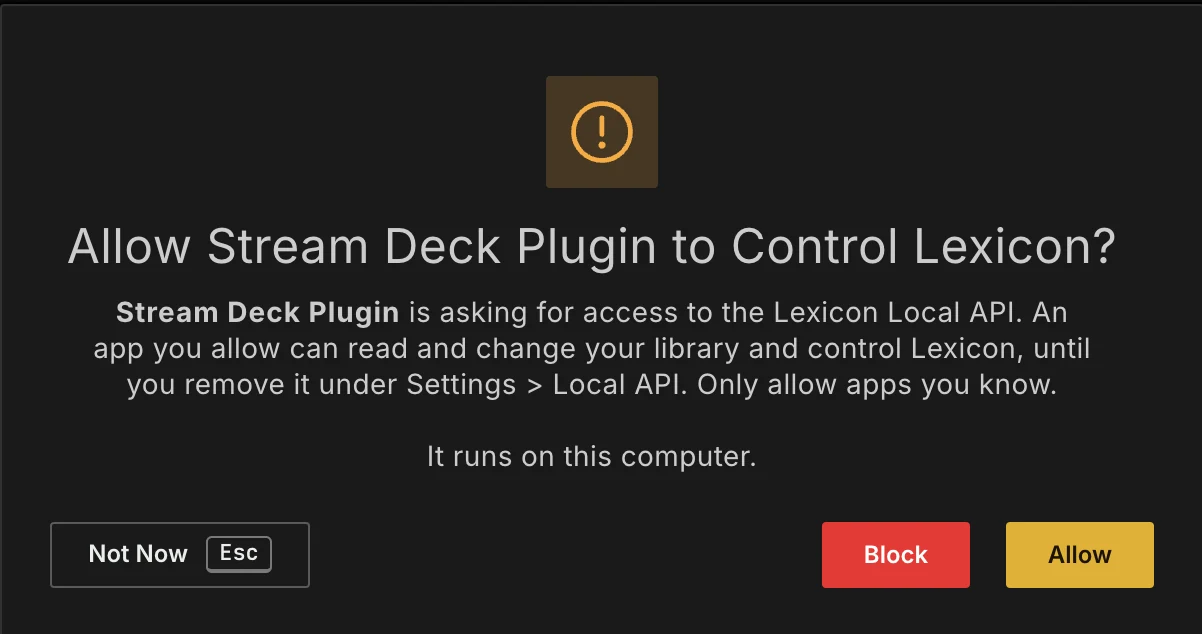
The first time, Lexicon asks whether the Stream Deck plugin may control it. Click Allow. From then on every key works straight away.
Layouts to copy
Three layouts for a 15-key Stream Deck: one for prep, one for beatgrids and one for during a set. Use them as they are or as a starting point. Open the list under a layout to see what each key is set to.
Beatgrid fixing
Every beatgrid control from the music player on its own key, with the plugin's beatgrid icons. Jump 4 beats back or forward to check the grid while the track plays.
PlayStart-4 beats+4 beats Click
 Set
 Left
 Right
 /2
 x2
 Add
 Delete
 NextTapQuantize
What each key is set to
- PlayPlay/Pause
- StartJump to start
- -4 beatsJump forward/backward beatsBeats -4
- +4 beatsJump forward/backward beatsBeats 4
- ClickToggle metronome
- SetMove marker to current position
- LeftMove current marker left
- RightMove current marker right
- /2Halve current marker BPM
- x2Double current marker BPM
- AddAdd marker at current position
- DeleteDelete current marker
- NextJump to next marker
- TapTap BPM
- QuantizeToggle quantize
During a set
With Ghost Curator following your DJ app: take one of the top three suggestions as your next track, roll the dice for something unexpected, and rate or tag what works on the dancefloor.
FollowOverlayDiceFindSearchNext 1Next 2Next 3MixablePanel5 starsCrowdPlayedCartUndoWhat each key is set to
- FollowFollow decks
- OverlayShow or hide the overlay
- DiceRoll the dice
- FindFind currently loaded track
- SearchOpen search
- Next 1Use suggestion 1 as next track
- Next 2Use suggestion 2 as next track
- Next 3Use suggestion 3 as next track
- MixableSelected tracks: Find mixable tracks
- PanelToggle sidepanel
- 5 starsSet ratingAmount 5
- CrowdToggle Custom Tag(s) assigned to shortcutAmount 3
- PlayedAdd selected tracks to fav. playlistAmount 2
- CartAdd playing track to cart
- UndoUndo last action
Good to know
Several actions on one key
Send Action works inside a Stream Deck multi action. Add a Drop cue and give the track 5 stars with a single press, for example.
Key images
Cue keys can show the cue marker in its color and beatgrid keys a matching icon: choose it under Key image. You can also give any key your own image and title in the Stream Deck app.
Custom Tag keys
Right click a tag on the Custom Tags page in Lexicon to give it a number. A tag key's Amount is that number.
Changed the port?
If you changed the Local API port in Lexicon, enter the same number in Lexicon port in the settings of any key. It applies to all keys.
Frequently asked questions
Which Lexicon plan do I need?
Essential or Ultimate. The plugin is free, but it talks to Lexicon through the Local API, which is part of those plans. See the plans.
Which Stream Deck models work?
Every Stream Deck with keys, with the Stream Deck app 7.1 or newer. On a Stream Deck+ the plugin works on the keys, not on the dials or the touch strip.
Does it work on Linux?
No. The Stream Deck app only runs on macOS and Windows.
Can it control my DJ app?
No, the plugin controls Lexicon. During a set, Ghost Curator follows your DJ app, and the plugin can pick its suggestions for you.
I used the plugin with Lexicon 1.11. What changes?
Lexicon 1.12 needs version 2 of the plugin. Install it over the old one: your keys keep their actions. The first key you press asks for access once.
A key does nothing. What now?
Check that Lexicon is running, that the Local API is on and that Stream Deck is allowed, not blocked, under Apps on the Local API settings page. The manual lists what else to check.
Get the plugin
Free for everyone on Lexicon Essential or Ultimate. Download it here and set up your first key in a few minutes.