
Convert your Traktor Pro library to Serato DJ with Lexicon. Playlists become crates, hot cues transfer, beatgrids stay locked. Free, Windows and macOS.
Applies to Traktor Pro 3 and 4 → Serato DJ Pro or Lite (versions 3 and 4). Traktor DJ is not supported.
Requirements
You need to have these installed:
- Traktor Pro 3 or 4
- Serato DJ Pro or Lite, launched at least once
- Lexicon - free for library conversion
Lexicon runs on Windows and macOS.
Steps to convert Traktor to Serato
The process has two parts: import your Traktor library into Lexicon, then sync it to Serato.
Part 1 - Import from Traktor
- Close both Traktor and Serato completely. Background processes must terminate for the databases to be readable.
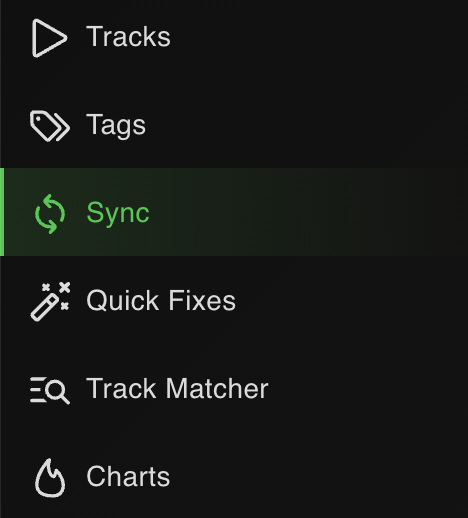
- Open Lexicon and go to the Sync page.
- Click
Import tracks & playlistsat the bottom.

- Choose Traktor from the dropdown. Lexicon auto-detects the database.

- Leave
Fullselected to import your entire library.

- Click
Start importing. Your Traktor library now lives in Lexicon.

Part 2 - Sync to Serato
- Go back to the Sync page (don't click Import again).
- Choose Serato from the dropdown. Lexicon auto-detects the Serato database.

- Leave
Fullselected. Leave the other options on their defaults.

- Click
Sync to Serato. Wait for it to finish.
When it completes, open Serato and your full library is there - playlists, cues, beatgrids and tags intact.
What transfers from Traktor to Serato
| Item | Transfers | Notes |
|---|---|---|
| Playlists & folder structure | Yes | Traktor playlists become Serato crates. Playlist folders map to Serato subcrate hierarchy. |
| Smart playlists | As Smart Crates | Traktor smart playlists come across as Lexicon smartlists, which sync to Serato Smart Crates. |
| Hot cues | Yes (up to 8) | Both apps support 8 hot cues. |
| Cue colors | Default colors | Traktor has no cue colors, so Serato applies its default palette. Set colors in Lexicon first if you want specific ones. |
| Beatgrids | Yes | Beatgrid markers and BPM transfer. |
| Loops | Yes (one active) | Serato supports one active loop per track. |
| Remix Sets | No | Remix Sets are Traktor-only and Lexicon does not support them. |
| Track metadata | Yes | Title, artist, album, genre, BPM, key, comments, ratings, custom tags. |
| Album art | Yes | Embedded art transfers. |
| Serato FLIP | N/A | You're going to Serato - if you later sync back and expect FLIP, be aware Lexicon doesn't read or write FLIP. |
Notes specific to Traktor → Serato
Remix Sets are lost
Lexicon doesn't support Traktor Remix Sets. Export them separately from Traktor if you need to keep them.
Cue colors - a fresh start
Traktor has no cue color concept. Cues arrive in Serato without color data, so Serato applies its defaults. To get specific colors, set them in Lexicon after importing, then sync.
NML file auto-detection
Lexicon auto-detects Traktor's collection.nml file. If auto-detection fails, right-click the collection in Traktor and export the NML, then point Lexicon to it.
Serato 3 vs Serato 4
Both are supported. Serato 4 handles streaming tracks (Beatport, Tidal, etc.) in crates; Serato 3 doesn't. Traktor supports Beatport streaming only - not Tidal or other services. For Beatport tracks to carry across, use Serato 4 and make sure Beatport is enabled in both apps.
Serato backups are automatic
Before Lexicon writes to Serato, it backs up the crate files and database to Music/_Serato_/Lexicon. If anything goes wrong, restore from there.
Frequently asked questions
Will Remix Sets survive?
No. Remix Sets are Traktor-only and Lexicon does not support them.
Do cue colors transfer?
Traktor doesn't store cue colors, so there's nothing to transfer. Serato applies its default colors, or you can set specific colors in Lexicon before syncing.
Will Traktor smart playlists become Serato Smart Crates?
Yes. They pass through Lexicon as smartlists and sync to Serato Smart Crates.
Does this work with Traktor Pro 4 and Serato 4?
Yes. Lexicon supports Traktor Pro 3/4 → Serato 3/4 (Pro or Lite).
Does this work on macOS?
Yes. The process is identical on Windows and macOS.
Can I sync back to Traktor later?
Yes. Run Serato to Traktor to sync changes back.
Other conversion guides
Converting from a different app, or to a different app?
Thoughts? Questions? Share them on the forum or chat about them on Discord.