These are a few of the advanced tools Lexicon has to offer.
You can watch the videos that explain them and follow the advanced course (coming soon) for a more in-depth look.

These are a few of the advanced tools Lexicon has to offer.
You can watch the videos that explain them and follow the advanced course (coming soon) for a more in-depth look.
Managing a large library often means dealing with duplicate files. The Find Duplicates utility scans your collection using audio signatures and compares your artist & title tags. It even matches files with different formats and lets you choose which copy to keep. Clean titles improve duplicate detection, so it's best to run Smart Fixes before scanning.
Event DJs often receive lists of requested songs. The Track Matcher allows you to upload or paste a text file, CSV or a playlist from Spotify, Tidal, Apple Music, SoundCloud or YouTube. Lexicon then searches your library for close matches and saves the results to a new playlist. You can adjust the search strictness as well. Lexicon will tell you how good a match was so you can quickly find the right tracks.
If the Track Matcher finds songs you don't own, Lexicon can help you buy them. The Store Links feature searches multiple online stores - Beatport, Apple Music/iTunes, Bandcamp, Juno Download and Traxsource. You can load your track titles into Store Links, or use the Track Matcher first to load a whole playlist, and Lexicon performs the searches automatically. Prices are shown where available and can be converted into your preferred currency.
Keeping up with new music is easy with Charts. Lexicon can display current Top-100 charts from Apple Music, Shazam (choose any country or even city), historical charts (yearly Top 100 since 1950), Beatport and Billboard. Tracks you already own are marked with double checkmarks, and you can load chart tracks into Store Links or playlists. You can choose to show only tracks that are new to the chart (e.g. added in the last four weeks on Apple Music or last week on Beatport).
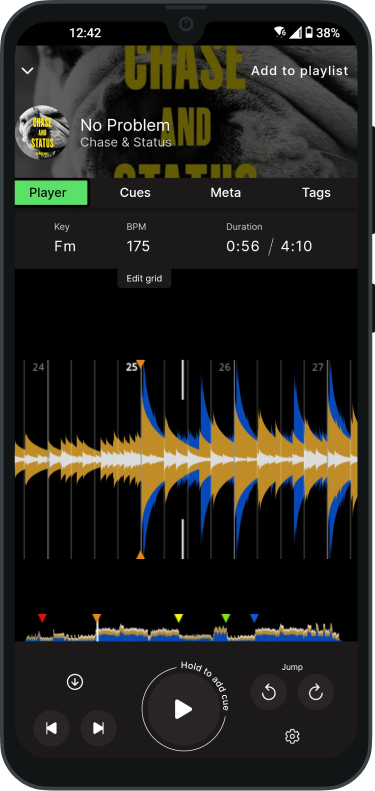
Lexicon offers a mobile app (iOS and Android) so you can manage tags, playlists and other metadata on the go.
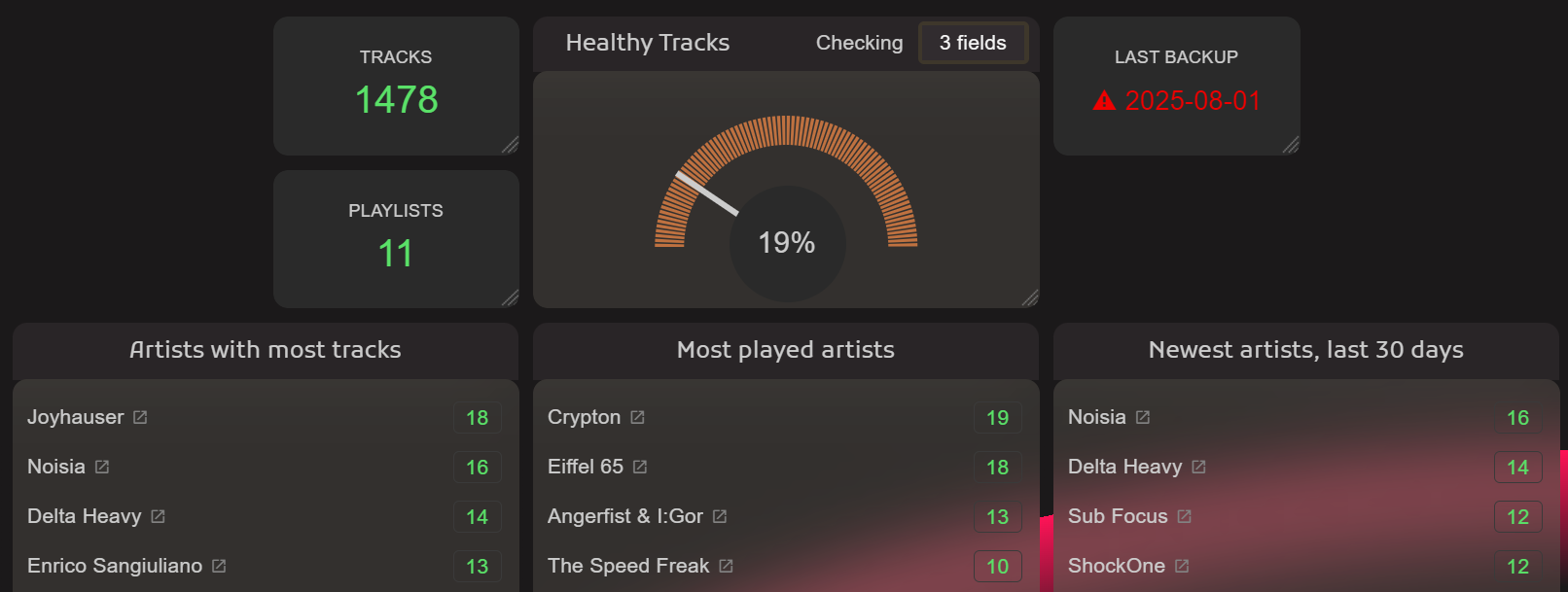
The statistics view provides an overview of your library's health - for example, the percentage of tracks missing cue points or with inconsistent BPMs. Use these stats to identify areas that need attention and improve your organisation.
Scan for duplicates: In Lexicon, open the Find Duplicates tool. Start a new scan to analyse your library using audio signatures and metadata. Review the matches and choose which copy to keep. Run Smart Fixes beforehand to improve matching accuracy.
Match requested tracks: Open the Track Matcher. Paste or upload a list of requested songs from a text file or streaming playlist. Adjust the search strictness if needed, then let Lexicon find the closest matches in your library. Save the results as a new playlist.
Buy missing tracks: Use Store Links to search multiple online stores (Beatport, Apple Music, Bandcamp, etc.) for songs you don't own. Load a playlist from Spotify, Tidal or another service and Lexicon will fetch store links and prices. Add tracks you want to buy to your cart or wish list.
Explore the charts: Browse the Charts section to see current Top-100 lists from Apple Music, Shazam, Beatport and Billboard. Click on tracks you don't own to add them to your library or store links. Filter by recently added tracks to stay up to date.
Check the stats and go mobile: Install the Lexicon mobile app on your phone or tablet to manage tags and playlists on the go. Use the statistics panel in the desktop app to see how many tracks are missing cues or have inconsistent BPMs, then fix those areas using the tools from previous chapters.