
Today I'm happy to announce Lexicon 1.6.0 is finally released! It might not sound very exciting, but this release has too many changes to even list here. This was all in beta for 6 months so it's great to finally be able to show it to everyone.
Let me take you through some of the highlights.
Waveform previews
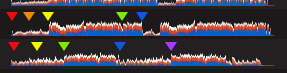
Every track now has waveform previews. You can click any point to instantly play a track there. All your cues are visible on the preview as well.
New update system
Nothing to see here because the update system is under the hood. This will make pushing updates much easier and faster for you to download and update Lexicon.
The old update system was showing cracks and small problems so it was good to get rid of it before it broke completely.
Beatport integration

You can now browse the entire Beatport catalog in Lexicon and keep an eye on your followed artists and labels with My Beatport. You can check out the top 100, hype 100 and charts.
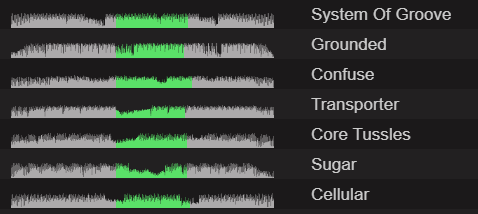
And one really cool thing here, is that you even get waveform previews for Beatport tracks! You can click these to instantly play them as well, just like normal tracks in Lexicon. Beatport has limited previews so only the green area is clickable.
Dragging tracks out of Lexicon
This was a much requested feature that I pushed back against for a long time. because new users would think dragging tracks out of Lexicon is the normal way to drag them into a DJ app. But doing so would not send any extra info like cues, beatgrids, etc. So in order to prevent that confusion, dragging tracks out of Lexicon was not yet possible.
Now there is a compromise, you just have to enable the setting:

After enabling that setting, you can drag any track out of Lexicon and into DJ apps or into your hard drive to copy them.
Undo history

Another much requested feature, having the ability to undo changes or deletes. Now Lexicon records changes or deletes in some events so you can undo them. This works when you delete a playlist or track. Or when you edit a track or run a smart fix.
Smartlist OR rules

This is feature that was requested by our advanced users. You can now link smartlist rules together with an OR clause, so only one rule within those linked rules needs to match.
And much more...
Just going to list a few changes that should be self explanatory:
- Serato and Traktor now have an option to control the beatgrid locks
- Reading Mixed in Key cues and beatgrids is now supported on all filetypes
- Popups can now be dragged and moved around
- Added regular expression smartlist rules for the really advanced technical users
- The Remove URL smartfix now also removes email addresses
- You can now edit the smart fix preview columns before confirming
Check out the full changelog for even more!
